Microsoft Security Compliance Manager 2.5 is now available for download and packed with new features. Download it here
Microsoft Security Compliance Manager 2.5
Leave a reply
Microsoft Security Compliance Manager 2.5 is now available for download and packed with new features. Download it here
As well as the Windows 8 Consumer Preview, don’t forget to evaluate the cool new features of Windows Server 8 Beta. It’s Cloud optmized, cost effective, more scalable and has tons of news features. Here are some key resources for you to evaluate Windows 8 Server Beta:
Microsoft Server and Cloud Platform – Windows Server 8 Beta
Windows 8 Server Beta Resources
Windows 8 Server Beta Capabilities
Windows 8 Server Beta for Developers
Windows 8 Server Beta Technical Documentation
Microsoft have announced the Windows 8 consumer preview !
Download it, install it, read all about it here
You will LOVE it !!! 🙂
Windows 8 Quick Resource Links:
Start Developing for Windows 8 now
Windows 8 Resources for IT Pros
Windows 8 Consumer Preview Technical Library on TechNet
Windows 8 Product Guide
Windows Engineering Team Blog
Windows 8 FAQ
This post briefly covers how to create custom web part settings in your Visual Studio solution.
In the main webPart.CS file add the following settings:
// Custom WP Setting – English RSS URL
[Personalizable(PersonalizationScope.Shared),
WebBrowsable(true),
WebDisplayName(“English RSS URL”),
WebDescription(“Enter the English RSS URL”),
Category(“Custom Web Part Settings”)]
publicstring ENRSSUrl { get; set; }
// Custom WP Setting – English RSS URL
[Personalizable(PersonalizationScope.Shared),
WebBrowsable(true),
WebDisplayName(“French RSS URL”),
WebDescription(“Enter the French RSS URL”),
Category(“Custom Web Part Settings”)]
publicstring FRRSSUrl { get; set; }
Update the createChildControls method:
protected override void CreateChildControls()
{
Control control = Page.LoadControl(_ascxPath);
// Reference public properties in visual webpart control
VisualWebPart1UserControl vswebcontrol = control asVisualWebPart1UserControl;
// Pass through the values to the web part control
vswebcontrol.toolPartENRSSUrl = ENRSSUrl;
vswebcontrol.toolPartFRRSSUrl = FRRSSUrl;
Controls.Add(control);
}
Reference the settings in the main web part control class:
public partialclass VisualWebPart1UserControl : UserControl
{
// Public Properties
public string toolPartENRSSUrl { get; set; }
public string toolPartFRRSSUrl { get;set; }
// Internal strings
string ENURL = string.Empty;
string FRURL = string.Empty;
protectedvoid Page_Load(object sender, EventArgs e)
{
// Set the string values
ENURL = toolPartENRSSUrl;
FRURL = toolPartFRRSSUrl;
// Reference the custom web part settings
lblEN.Text = ENURL;
LblFR.Text = FRURL;
}
}
It’s as simple as this !
Its been a while since my last post on this solution. The code is almost complete and this is the final update to the current solution. The solution can be downloaded from CodePlex here.
In this post, the code update covers the following areas:
1 – A new method has been added to read the configuration list where we specify source and target document libraries. A new class named SPListOperations was created with a method named queryConfigList to query the replicator configuration list for source and target libraries.
2 – The itemupdated and itemdeleted methods in the solution have been updated to call a method that performs the add and delete operation.
Changes to the Event Receiver methods
///
<summary>
///
An item was updated.
///
</summary>
public override void ItemUpdated(SPItemEventProperties properties)
{
base.ItemUpdated(properties);
replicatorOperation(properties,“Added/Updated”);
}
<summary>
///
An item was deleted
///
</summary>
public override void ItemDeleted(SPItemEventProperties properties)
{
base.ItemDeleted(properties);
replicatorOperation(properties,“Deleted”);
}
New method to perform the copy/update and delete operations
public void replicatorOperation(SPItemEventProperties properties, string operation)
{
using (SPSite spsite = newSPSite(properties.WebUrl))
try
{
EventFiringEnabled = false;
if (properties.ListItem.ParentList.Title != “Replicator Logger”)
{
SPWeb siteForLogger = spsite.OpenWeb();
// determine target filename – the same as the source
string targetfilename = properties.ListItem.Name.ToString();
string SourceLibPath = properties.WebUrl + “/” + properties.ListItem.ParentList.ToString();
string sourceLibrary = properties.ListItem.ParentList.ToString();
string targetLibraryFromConfigList = SPListOperations.queryConfigList(siteForLogger, sourceLibrary).ToString();
// Query the Configuration List
if (targetLibraryFromConfigList != “NotListed”)
{
// Copy/Delete the file to the destination library (targetlibrary)
if (operation == “Added/Updated”)
{
properties.ListItem.File.CopyTo(targetLibraryFromConfigList + “/” + targetfilename, true
);
}
if (operation == “Deleted”)
{
SPFile spFileTarget = siteForLogger.GetFile(targetLibraryFromConfigList + “/” + targetfilename);
spFileTarget.Delete();
}
// Write to the Replicator Log – unfinished…
ReplicatorLogger replogger = newReplicatorLogger();
// Get the current Date and Time
DateTime dtime = DateTime.Now;
// Create the title for the logger list item
string title = (dtime.Date.ToString() + “_” + dtime.Hour.ToString() + “_” + dtime.Minute.ToString() + “_” + dtime.Second.ToString() + “_” + targetfilename.ToString());
// Write to the log list
EventFiringEnabled = false;
replogger.writeToLog(title, dtime.ToShortDateString(), properties.UserDisplayName.ToString(), operation, SourceLibPath, targetfilename, siteForLogger);
}
}
}
catch (SPException spEx) { }
finally
{
// Enable Event Firing
EventFiringEnabled = true;
}
}
SPListOperations Class and a new queryConfigList method
using Microsoft.SharePoint;
namespace DocLibraryReplicator
{
internal class SPListOperations
{
publicstaticstring queryConfigList(SPWeb spWeb, string query)
{
// Build a query.
string result = “NotListed”;
SPQuery spQuery = newSPQuery();
spQuery.Query = string.Concat(“<Where><Eq>”, “<FieldRef Name=’Source Library Path and Name’/>”,“<Value Type=’Text’>” + query + “</Value>”, “</Eq></Where>”);
spQuery.ViewFields = string.Concat(“<FieldRef Name=’Source Library Path and Name’ />”);
spQuery.ViewFieldsOnly = true;
// Fetch only the data that we need.
// Get data from a list.
string listUrl = spWeb.ServerRelativeUrl + “lists/Replicator Configuration”;
SPList spList = spWeb.GetList(listUrl);
// result = list.GetItems(spQuery);
string sourceList = spWeb.Url + “/” + query;
foreach (SPListItem spItem in spList.Items)
{
string a = spItem.GetFormattedValue(“Source Library Path and Name”).ToString();
if (spItem.GetFormattedValue(“Source Library Path and Name”).ToString() == sourceList)
{
result = spItem[“Target Library Path and Name”].ToString();
}
}
return result;
}
}
}
There you have the final pieces which make up the replicator. This solution does not take checking SPFolders into consideraton, but could easily be modified to accomodate this.
Today I added the following changes to the solution:
1 – Added a ReplicatorLogger Class to the solution.
2 – Updated the Feature Receiver code to create a Replicator logger list in the Web.
3 – Updated the ItemUpdated method in the Event Receiver to write to the Replicator Logger list when an item is added or updated.
The following code is the new ReplicatorLogger Class:
internal class ReplicatorLogger
{
publicvoid writeToLog(string title, string logDate, string modifiedBy, string action, string copySource, string fileName, SPWeb web)
{
// Get the current httpcontext
System.Web.HttpContext currentContext = System.Web.HttpContext.Current;
// Set the httpcontext to null;
HttpContext.Current = null;
using (web)
{
try
{
// Create an item the Replicator Logger list to record the event
SPList spList = web.Lists[“Replicator Logger”];
SPListItem logItem = spList.Items.Add();
logItem[“Title”] = title;
logItem[“Log Date”] = logDate;
logItem[“Modified By”] = modifiedBy;
logItem[“Action”] = action;
logItem[“Copy Source”] = copySource;
logItem[“File Name”] = fileName;
logItem.Update();
}
catch (SPException spEx)
{
}
finally
{
// Set the httpcontext back to the original
System.Web.HttpContext.Current = currentContext;
}
}
}
}
The following code was added to the Feature Receiver to create the Replicator logger list:
// Create the replicator logging list
spWeb.Lists.Add(“Replicator Logger”, “Document Library Replicator Logging List”, spWeb.ListTemplates[“Custom List”]);
SPList replicatorLoggingList = spWeb.Lists[“Replicator Logger”];
replicatorLoggingList.NoCrawl = true;
replicatorLoggingList.Fields.Add(“Log Date”, SPFieldType.Text, true);
replicatorLoggingList.Fields.Add(“Modified By”, SPFieldType.Text, true);
replicatorLoggingList.Fields.Add(“Action”, SPFieldType.Text, true);
replicatorLoggingList.Fields.Add(“Copy Source”, SPFieldType.Text, true);
replicatorLoggingList.Fields.Add(“File Name”, SPFieldType.Text, true);
replicatorLoggingList.Update();
// Update the default view to show the new fields
SPView spLogView = replicatorLoggingList.DefaultView;
spLogView.ViewFields.Add(“Log Date”);
spLogView.ViewFields.Add(“Modified By”);
spLogView.ViewFields.Add(“Action”);
spLogView.ViewFields.Add(“Copy Source”);
spLogView.ViewFields.Add(“File Name”);
spLogView.Update();
The code below updates the Event Receiver to also write the properties to the Replicator Logger list:
public overridevoid ItemUpdated(SPItemEventProperties properties)
{
base.ItemUpdated(properties);
using (SPSite spsite = newSPSite(properties.WebUrl))
try
{
EventFiringEnabled = false;
if (properties.ListItem.ParentList.Title != “Replicator Logger”)
{
SPWeb siteForLogger = spsite.OpenWeb();
// determine target filename – the same as the source
string targetfilename = properties.ListItem.Name.ToString();
string SourceLib = properties.WebUrl + “/” + properties.ListItem.ParentList.ToString();
// Copy the file to the destination library (targetlibrary)
properties.ListItem.File.CopyTo(properties.WebUrl + “/” + “targetlibrary” + “/” + targetfilename, true
);
// Write to the Replicator Log – in test mode…
ReplicatorLogger replogger = newReplicatorLogger();
// Get the current Date and Time
DateTime dtime = DateTime.Now;
// Create the title for the logger list item
string title = (dtime.Date.ToString() + “_” + dtime.Hour.ToString() + “_” + dtime.Minute.ToString() + “_” + dtime.Second.ToString() + “_” + targetfilename.ToString());
// Write the information to the logger list
EventFiringEnabled = false;
replogger.writeToLog(title, dtime.ToShortDateString(), properties.UserDisplayName.ToString(),“New/Updated Document”, SourceLib, targetfilename, siteForLogger);
}
}
catch (SPException spEx) { }
finally
{
// Enable Event Firing
EventFiringEnabled = true;
}
}
Here is an example of the item created in the Replicator Logger list when an item is uploaded or updated:

In my previous post I demonstrated how easy it was to have a document copied, on upload, to another document library with very few lines of code. This involved utilizing an Event Receiver which performed an override using the ItemUpdated method. This would also support document updates as the code utilized the ItemUpated method.
Since then I have been working on a feature receiver which that creates a SharePoint list that defines the source and target document libraries for the copy operation.
The ideal approach is to code this so that when the Document Library Replicator feature is activated (the event receiver), we would like the replication configuration list to be created at the same time in the current Web. This has been achieved by created a Feature Receiver within the project that does the following:
1 – Create the “Replicator Configuration” list.
2 – Sets the crawl attribute for the list to none.
3 – Create two text fields for the source and target path and name
4 – Adds the two new text fields to the default view.
The feature receiver only overrides the FeatureActivated method, and does not remove the list when the Document Library Replicator feature is de-activated.
The code for the feature receiver is below:
public class Document_Library_ReplicatorEventReceiver: SPFeatureReceiver
{
.public override void FeatureActivated(SPFeatureReceiverProperties properties)
{
try
{
using (SPWeb spWeb = (SPWeb)properties.Feature.Parent)
{
// Create the replicator configuration list
SPSite spSite = spWeb.Site;
spWeb.Lists.Add(“Replicator Configuration”, “Document Library Replicator Configuration”, spWeb.ListTemplates[“Custom List”]);
SPList replicatorConfigList = spWeb.Lists[“Replicator Configuration”];
replicatorConfigList.NoCrawl = true;
replicatorConfigList.Fields.Add(“Source Library Path and Name”, SPFieldType.Text, true);
replicatorConfigList.Fields.Add(“Target Library Path and Name”, SPFieldType.Text, true);
replicatorConfigList.Update();
// Update the default view to show the new fields
SPView spView = replicatorConfigList.DefaultView;
spView.ViewFields.Add(“Source Library Path and Name”);
spView.ViewFields.Add(“Target Library Path and Name”);
spView.Update();
}
}
catch (SPException spEx)
{
}
finally
{
}
}
}
I have been recently working on coding a SharePoint document library replicator. Everytime an item is updated in one library, I wanted to ensure a copy of the updated document is written to another library within the same Web.
Even though I am still working in the final solution, I wanted to share a small code snippet which is a SharePoint 2010 Event Receiver that copies a file from one library to a specified target document library named “targetlibrary”. To perform this basic function the code was very straight forward, and any libraries that get updated would get the file copied to the target library within the Web.
The properties are hard-coded in this sample, but in my final solution I may have a list which manages source and destination library urls. It could also handle and manage SPFolders from the source to the target libraries. I’m also adding a log writer to show the copied files with a timestamp that shows properties such as the last user who edited the file. The log writer will write the information to a SharePoint list.
*** You may want to add some code to skip the block if an update is made to the target library ***
using System;
using System.Security.Permissions;
using Microsoft.SharePoint;
using Microsoft.SharePoint.Security;
using Microsoft.SharePoint.Utilities;
using Microsoft.SharePoint.Workflow;
using System.IO;
namespace DocLibraryReplicator.Document_Library_Receiver
{
///<summary>
/// List Item Events///</summary>
publicclass Document_Library_Receiver : SPItemEventReceiver
{
///<summary>/// An item was added.///</summary>
publicoverridevoid ItemAdded(SPItemEventProperties properties)
{
base.ItemAdded(properties);
}
///<summary>/// An item was updated.///</summary>
publicoverridevoid ItemUpdated(SPItemEventProperties properties)
{
base.ItemUpdated(properties);
using (SPSite spsite = newSPSite(properties.WebUrl))
try
{
// determine target filename – the same as the source
string targefilename = properties.ListItem.Name.ToString();
// Disable Event Firing as the target will try to copy to itself
EventFiringEnabled = false;
// Copy the file to the destination library (targetlibrary) ** BEWARE ** Target file overwritten with true directive
properties.ListItem.File.CopyTo(properties.WebUrl + “/” + “targetlibrary” + “/” + targefilename, true);
// Enable Event Firing
EventFiringEnabled = true;
}
catch (SPException spEx) { }
finally { }
}
}
}
Today I came across a very odd issue where I had seen a number of missing SharePoint User Profiles missing from the Active Directory synchronization.
The problem was, the deleted Active Directory users were left in the User Profile database marked as deleted, but never deleted by the “My Site Cleanup Job”. You can query the UserProfile_Full table to determine which profiles have the bdeleted column set to 1.
A description of the timer job is displayed below:
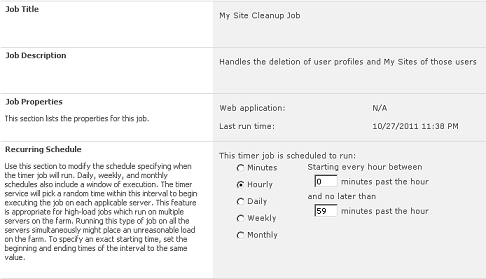
It turned out that the solution was to ensure a My Site host had been configured as part of the farm setup, so that the missing profiles from import are correctly removed. The My Site Cleanup Job runs every hour, by default, and even though the job looked as though it ran successfully it wasn’t actually performing the specified function.
You can follow this Microsoft TechNet Article to configure a My Site Host in your farm.
Recently, I came across this white paper where the Enterprise Strategy Group Lab provided an excellent summary on virtualizing Microsoft SQL Server 2008 R2, Microsoft SharePoint Server 2010 and Microsoft Exchange Server 2010. The white paper covers the technical architecture utilized within the lab, with detailed performance tests and workload scalability graphs. Each section provides an excellent summary and a set of highlights.
I recommend reading this white paper for some insight into the scale that Hyper-V R2 SP1 provides to these applications.
The white paper can be downloaded here.

