Many models in the Azure Open AI service are being deprecated on June 14th 2024. All Microsoft Azure Open AI service model retirement dates can be found on Microsoft learn here. It’s time to deploy GPT-4 to Blazor Simple AI and make the minor changes in appsettings.json to utilise the a deployment based on GPT-4. Follow the steps below.
To download all parts of this post, you can download the PDF here.
Deploy a new Model with Azure AI Studio
- Launch and authenticate to AI Studio https://oai.azure.com/
- Click Deployments
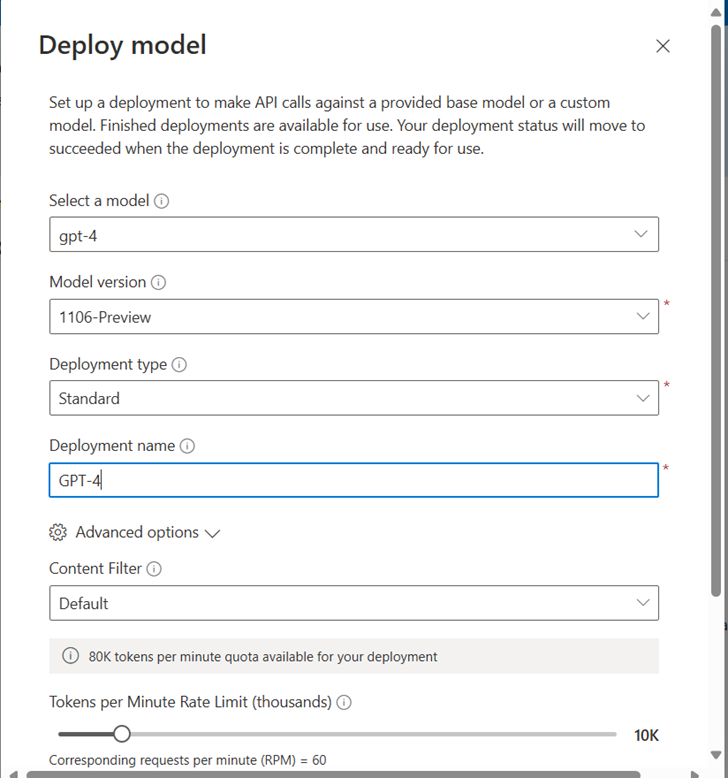
- Click Deploy a new model
- Set the model version, deployment type, I have chosen standard, enter the name of the deployment and the number of required tokens minute and click Create.
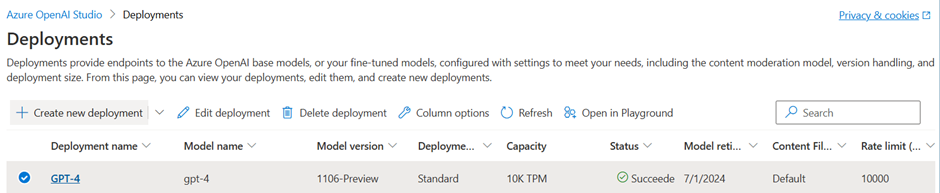
Your model will be deployed.
Update the configuration settings in the application
In the configuration section below, update the Open AI deployment name setting, in my case the deployment name I had chosen is “GPT-4”.
"AzureAIConfig": {
    "OpenAIDeploymentName": "GPT-4",
}
That’s all you need to do, Blazor Simple AI Chat is now using Chat GPT-4 from the Microsoft Azure Open AI service. No other code changes are necessary at this stage.
 Welcome to Tejinder Rai's blog, Cloud Solutions Architect